




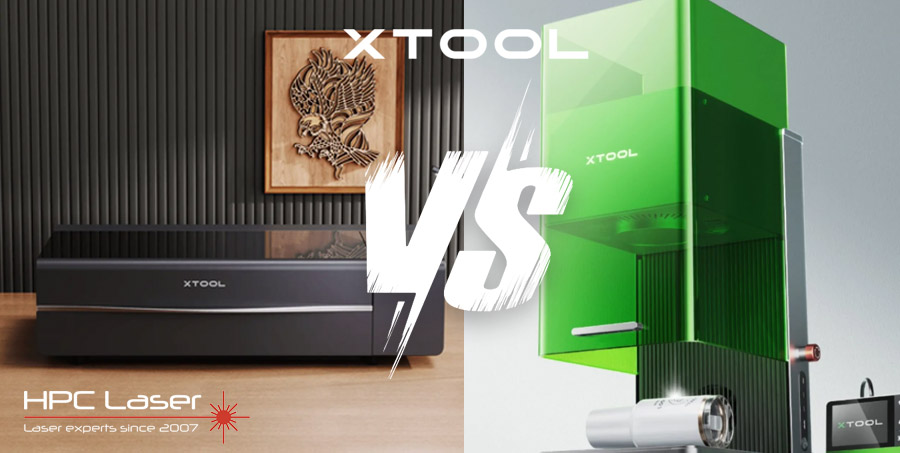
16 Jul xTool P2S vs F1 Ultra: Which Laser Cutter Is Right for Your UK Business?
If you’re based in the UK and thinking about buying a laser cutter, you’ve no doubt come across the xTool brand.
There are quite a large selection of xTool laser cutters & engravers to choose from, all with their own purposes, pros, and cons depending on your unique requirements.
Today we’re going to compare 2 powerful machines from xTool: the xTool P2S and the xTool F1 Ultra. They’re both excellent in their own right, but they serve quite different needs — and if this is your first time buying a laser cutter, it can be tricky to know which one’s right for you.
We’re going to break things down for you from the point of view of someone who works with this equipment regularly — not just a spec sheet, but how they behave in real life, what they’re good at, and what you’ll need to think about for a typical setup, whether you’re running a home workshop, small business, or just looking to earn some money online.
A Quick Overview of the Machines
Let’s start with a quick intro to both models:
xTool P2S Laser Cutter & Engraver

The xTool P2S is a CO2 laser cutter with a 55W laser and a large working area. It’s powerful, fast, and designed to handle a wide range of materials including wood, acrylic, leather, paper, and more. It’s particularly good for cutting — not just engraving — and its large format makes it suitable for larger projects or batch work.
Space Requirements:
For many UK buyers, space is an important consideration. Unlike many American homes, UK households are typically much smaller, with a small garden shed and sometimes a garage,
The P2S is a large, CO2 laser machine, and you’ll need to make space for it. It’s certainly pushing the boundaries of what could be considered a ‘desktop laser cutter’.
The machine itself measures around 1m wide, 635mm deep, and 268mm high — and that’s before you factor in accessories like the a raiser base, air assist, ventilation, or filtration unit.

In the image above, a riser base has been installed, but even so, you’ll want at least a 1.5m x 1.5m clear area in your workshop or garage to comfortably operate and maintain the machine. You’ll also need:
- A sturdy workbench – enough to support 45kg, or more if using the raiser base.
- Ventilation access — either through a window or via an air filtration system.
- Easy access around the machine for material loading, cleaning, and maintenance.
xTool F1 Ultra Laser Engraver

The F1 Ultra is an extremely portable desktop laser engraver that combines diode and fibre laser technology in one machine (We’ve got an in-depth guide comparing CO2 and fibre laser cutters here).
That dual-laser setup means it can engrave on a much wider variety of materials — including metals, which CO2 lasers usually can’t handle without special coatings. It’s extremely precise, ultra-fast, and designed more for engraving than cutting.
Comapred to the P2S — it is about the size of a small desktop printer. It fits comfortably on a workbench, desk, or shelf and doesn’t require any special ventilation (it has built-in filtration and full enclosure). If you’re tight on space or working from a flat, studio, or shared room, the F1 Ultra is a more flexible option, and it does have the option of additional accessories such as this handy conveyor system that expands your working area to 500mm.
However, with it’s lack of size and power it does somewhat limit what you can do, and it’s worth mentioning that this machine is not primarily design as a cutting device, although it will cut some thin materials (you can find a full list on the product page here.)
Key Specs at a Glance
| Feature | xTool P2S | xTool F1 Ultra |
|---|---|---|
| Laser Type | 55W CO₂ | 20W Diode + 2W Fibre |
| Working Area | 600mm x 308mm | 220mm x 220mm (with rotary / conveyor options) |
| Max Speed | 600mm/s | Up to 10,000mm/s |
| Material Capability | Wood, acrylic, leather, paper, cardboard | Stainless steel, aluminium, brass, titanium, opaque/dark coloured plastics, leather, more |
| Portability | Stationary | Portable |
| Cutting Thickness | Up to 12mm wood (in real world situations) | Not suitable for thick cutting |
| Software | xTool Creative Space, LightBurn | xTool Creative Space, LightBurn |
| Safety | Class 1, but Class 2 when used with any accessories (such as the riser base) | Enclosed but Class 4 Laser, CE certified |
| Typical UK Use Case | Home workshops, craft businesses, small production runs | Jewellery, gifts, personalisation, mobile setups |
Understanding the Laser Types
This is where things get interesting, especially if this is your first laser machine.
CO2 Laser (xTool P2S)
- Great for: Cutting and engraving organic materials like wood, acrylic, leather, fabric, card, etc.
- Strengths: CO2 lasers are powerful and have wide beam coverage, making them excellent for both engraving and cutting thicker materials.
- Limitations: They can’t engrave metals directly (unless coated), and they require a cooling system and proper ventilation due to fumes and smoke. They’re also larger machines, so they need more space.
Diode Laser (xTool F1 Ultra)
- Great for: Engraving woods, dark plastics, leather, and coated metals.
- Strengths: Small, efficient, relatively low maintenance, and safe to use indoors with built-in enclosures.
- Limitations: Diode lasers can struggle with highly reflective or clear materials. Not ideal for cutting thick materials.
Fibre Laser (xTool F1 Ultra)
- Great for: Directly engraving metals such as stainless steel, brass, titanium, and even jewellery-grade metals.
- Strengths: Extremely precise, great contrast, and incredibly fast. This laser is what sets the F1 Ultra apart from almost every other mid-range desktop laser cuter.
- Limitations: It’s typically for engraving only — fibre lasers of this power (20w) will struggle to cut metal. Also, they come with a higher price tag due to the advanced tech.
What Are You Planning to Make?
Here’s where you’ll want to stop and think about your goals:
Go for the P2S if you want to:
- Cut and engrave wooden signs, boxes, acrylic decorations, or packaging.
- Produce larger items like wall art, or shop signage.
- Batch-produce items in a small workshop or garden shed.
- Work mainly with organic materials.
The P2S is your workshop workhorse — large, powerful, and built for production.
Go for the F1 Ultra if you want to:
- Engrave on metals like stainless steel or aluminium.
- Personalise jewellery, metal flasks, pens, phone cases, or business cards.
- Set up in a small studio, flat, or mobile unit.
- Focus on highly detailed engraving rather than cutting.
The F1 Ultra is your engraving expert — compact, clever, and seriously precise.
Other Considerations
Ventilation
- The P2S needs external exhaust or a filter unit to deal with fumes.
- The F1 Ultra has an internal fan system — but will still require a highly ventilated area or ideally, to be combined with an xTool AP2 fume filter.
Software
- Both machines work with xTool Creative Space (free) and LightBurn (paid).
- If you want finer control or already use LightBurn, both machines are fully compatible.
Considerations for UK Buyers
As an official xTool supplier in the UK, we work with a lot of British customers, so here are some practical points why you should consider HPC Laser before buying from xTool direct.
Why Buy Your xTool from HPC Laser?
Buying your xTool from HPC Laser means you’re not just getting a machine — you’re getting a full support package right here in the UK.
- Expert, Honest Advice: We’re based in Halifax and know these machines inside out. Not sure which xTool is right for you? We’ll help you choose the best setup for your needs — no pressure, just practical guidance.
- See Before You Buy: Book a live demo at our showroom to see the xTool range in action.
- No-Hassle Warranty: Unlike buying direct, we offer a UK onsite warranty — no need to ship your machine abroad for repairs.
- Delivery, Setup & Training: Our engineers can deliver, install, and show you exactly how to use your new machine. We even offer onsite servicing and callouts if anything goes wrong.
- Lifetime UK Support: As an HPC customer, you get free lifetime technical support from our UK-based helpdesk. Whether you need help with setup, software, or troubleshooting, we’re just a phone call away.
In short, we make sure your xTool experience is smooth, supported, and stress-free — from day one and for years to come.
So The Final Verdict: Which Should You Choose?
Let’s break it down one last time.
| If you want to… | Go for… |
|---|---|
| Cut large sheets of wood or acrylic | xTool P2S |
| Engrave metals like stainless steel or brass | xTool F1 Ultra |
| Run a small workshop or production line | Both |
| Have a portable machine for craft events | xTool F1 Ultra |
| Focus on batch production and scalability | xTool P2S |
| Focus on highly detailed, small-format engraving | xTool F1 Ultra |
Final Thoughts from the Bench
As someone who’s worked with all kinds of laser machines, I can tell you both the P2S and the F1 Ultra are well-engineered, user-friendly, and packed with capability. But they’re very different tools.
If you think of them like this:
- The P2S is a cutting powerhouse — made for those who want to make and sell tangible products.
- The F1 Ultra is a precision engraver — perfect for adding value and detail to smaller items.
Still not sure? Drop us am email at sales@hpclaser.co.uk, use our live chat or simply give us a ring on 01422 310800 — we’re happy to help you figure out what’ll work best in your setup.
Other Frequently Asked Questions
Incase you didn’t find the answers to your questions above, here’s some common questions our sales team get about the xTool range of laser cutters.
Do I need special software to use xTool machines?
All xTool machines come with access to xTool Creative Space, which is free and easy to use for beginners. If you want more advanced control or already work with other laser software, you can also use LightBurn — it’s compatible with most xTool models, including the P2S and F1 Ultra. We’ve written a more comprehensive guide on laser cutter software here.
How long does it take to learn how to use an xTool laser?
Most users can get up and running within a few hours. There are 1000’s of videos on Youtube, from basic to advanced lessons. xTool themselves also have a very helpful Learning Center where you can learn how to setup and use your machine from the manufacturer direct.
But by buying from HPC Laser, we make the learning curve even easier — offering delivery, the option of home installation, and training services. Our support team is also available if you get stuck at any point down the line.
How loud are the xTool P2S and F1 Ultra laser cutters when in use?
Both machines are relatively quiet compared to traditional workshop tools. The F1 Ultra is whisper-quiet and perfect for home use. The P2S is louder due to its air assist and exhaust fan but is still manageable in a garage or shed environment.
How much maintenance do xTool laser cutters require?
Maintenance is straightforward once you’ve done it once. You’ll need to regularly clean lenses, check focus, and keep the machine free from dust and debris. The P2S may also require occasional alignment checks. HPC Laser provides guidance, training, and even onsite servicing if needed. Whilst this guide isn’t specific to xTool laser cutters, this laser cutter maintenance guide should give you some insight into the typical process.
Do I need any kind of licence or certification to use an xTool laser?
No special licence is required for personal or commercial use of laser cutters like the xTool P2S or F1 Ultra in the UK. However, if you’re using it in a public space or school, there are strict laws and safety rules to follow regarding the class of laser you’re using. It’s best to speak to one of our team if you feel you have questions about laser classes.

Sorry, the comment form is closed at this time.